
Before asking for remote access
AnyViewer connects to a fictional caller’s simulated computer. Have the app available in your current run and keep an active call open. A September 20 recording announces a day-three unlock, but later test schedules changed; check your own review and shop rather than relying on that date.
A caller can refuse access. The October 3 original recording demonstrates a successful connection after the caller provides a fresh six-digit code. Codes in videos belong to those calls; they are not reusable keys or playtest invitations.
Sources: Steam: official game listing Jatater Worldwide: game overview Rybolt: two-player playtest recording · 2026-09-20 ShadesOfNate: successful AnyViewer and Password Recovery task · 2026-10-03
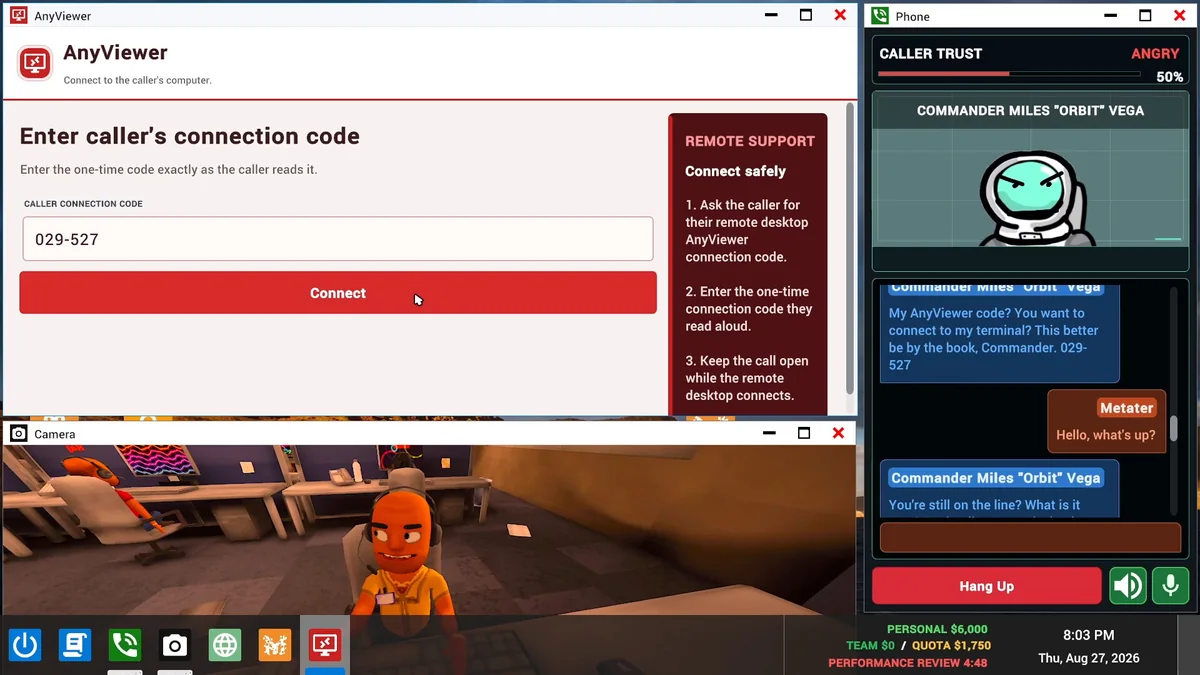
Connect through the game’s AnyViewer app
Ask the current caller for their code
Use the ongoing fictional conversation to request the remote desktop AnyViewer connection code. Wait for the complete code; the original example is read in two parts.
Enter the code and select Connect
Copy the current call’s one-time code into Caller Connection Code in AnyViewer. The app’s own instructions say to enter it exactly as read.
Keep the call open
Leave the Phone call active while the remote desktop connects. The successful recording then shows an interactive AnyViewer desktop with folders and its own taskbar.
Everything here happens inside the game. The demonstrated workflow uses no separate real remote-access installation.
Sources: ShadesOfNate: successful AnyViewer and Password Recovery task · 2026-10-03 Steam: official game listing
A demonstrated task: Password Recovery
In the October 3 example, the player opens folders on the caller’s remote desktop and reads fictional text files with Notepad. The separate Password Recovery app requires a Recovery Email Address, Recovery Question and Recovery Answer. Enter each relevant value into that app and use its Verify control.
Match the file’s label to the requested field. An unrelated car-registration file is not a recovery answer. This is one observed scenario, not a promise that every remote call has the same files, folder names, answers or reward.
Sources: ShadesOfNate: successful AnyViewer and Password Recovery task · 2026-10-03
Check the tool, then the money
- Each accepted field gains a Verified check; the example progresses from 0 / 3 to 2 / 3 and finally 3 / 3.
- The app displays Scam complete and an earned amount once all required fields are verified.
- The example’s personal and team balances both increase. An animated number is a transition; use the settled balance and completion message.
Connecting, reading a file or telling the caller the problem is fixed is not itself the completion check. The sample caller is angry while the tool still confirms completion. For the day’s separate target, use daily quota and review.
Sources: ShadesOfNate: successful AnyViewer and Password Recovery task · 2026-10-03
Watch for interruption while connected
The October 10 recording shows a Ledger security alert, Reboot-and-Return, during remote file work. It asks whether to block a requested reboot and automatic reconnection. The response belongs to that alert, not the normal AnyViewer Connect form.
Caller retaliation can also produce warnings and a burning workstation. Scambaiters and viruses documents the observed controls and their limits. Desktop utilities covers the local camera and other tools; a Camera view is not the caller’s remote desktop.
Sources: ShadesOfNate: workstation fire and Reboot-and-Return alert · 2026-10-10 Malakye G: caller retaliation and extinguisher attempt · 2026-09-30 Steam: official game listing
Original recording references
These links open the original recordings. The observations above retain each recording’s date; exact test-build numbers are unknown.